Announcing the Scalnex SEO Chat Assistant
Managing search engine optimization often requires balancing multiple fragmented workflows across content creation, link building, and keyword tracking. To simplify these operations, we are announcing the new Scalnex assistant feature. Users can now chat and complete all their SEO tasks within a single interactive interface.
Executing an effective search strategy typically involves jumping between different specialized platforms. To streamline this process, the Scalnex assistant feature provides a conversational workspace where teams can execute actions directly through chat. Instead of manually navigating complex dashboards, users can converse with the assistant to handle essential optimization activities efficiently.
Overview of the Scalnex Assistant Feature
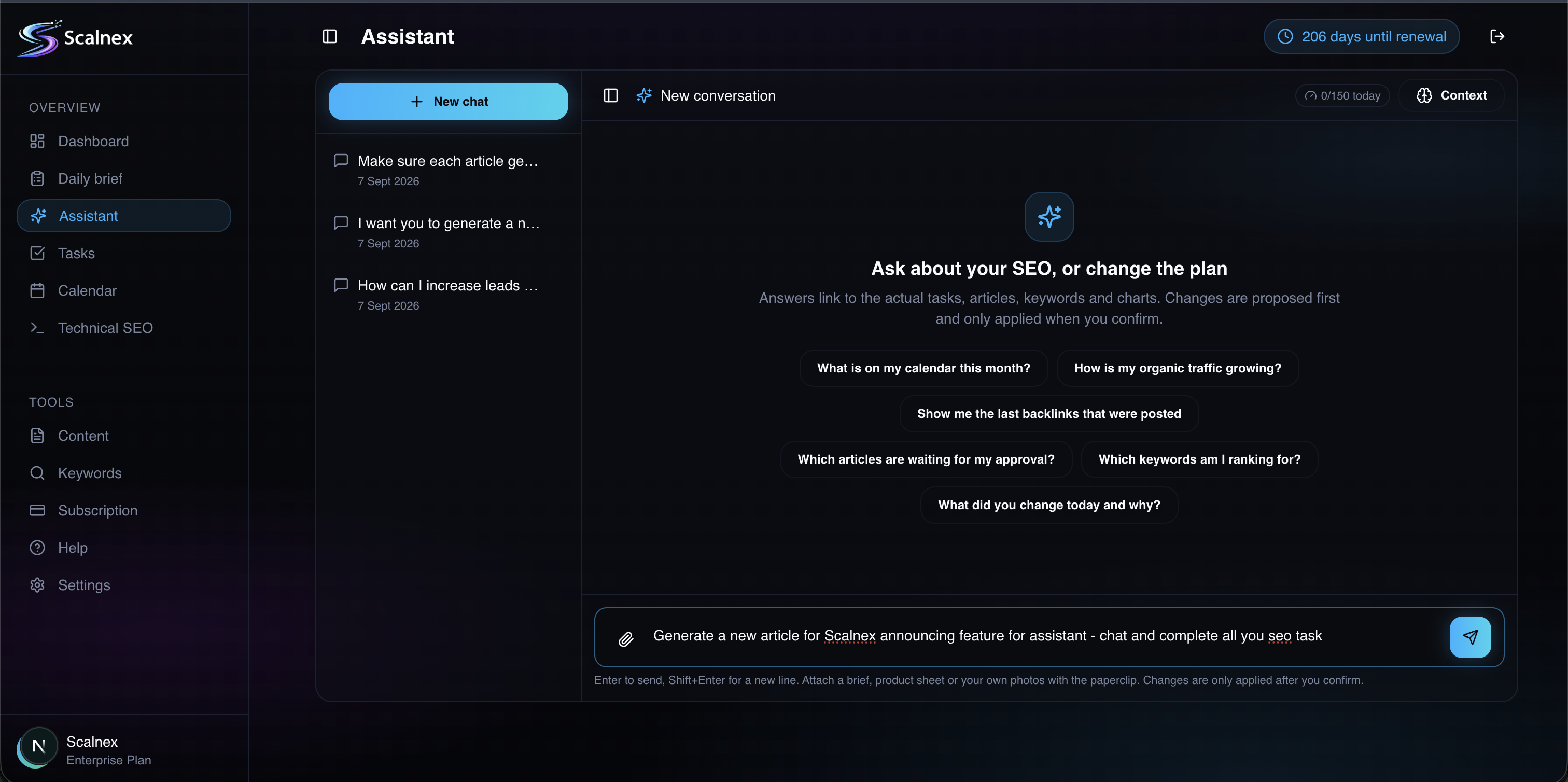
The Scalnex chat interface is built to turn conversational inputs into immediate tactical outputs. Designed with a clean, dark-mode workspace, the system displays AI prompt suggestions to guide users and accepts direct article requests along with strategic prompts. By integrating conversational AI with the broader Scalnex software capabilities—including automated link building, smart keyword tracking, and AI-driven content optimization—the assistant serves as an interactive hub for search engine tasks.
The table below provides an overview of the interface features and operational capabilities available in the new tool:
| Capability | Chat Assistant Function | Primary Benefit |
|---|---|---|
| Prompt Guidance | Built-in prompt suggestions | Helps users initiate complex tasks without setup friction |
| Article Generation | Direct article request processing | Accelerates initial draft creation and content production |
| Workflow Hub | Unified conversational chat input | Replaces disjointed tools with a single operational view |
| Strategic Execution | Task automation via conversation | Reduces manual overhead across routine optimization jobs |
Key Use Cases for the Chat Assistant
The Scalnex assistant is structured to support a wide variety of search tasks from start to finish. Rather than relying on separate software for planning, research, and production, users can manage each stage through natural chat commands.
Content Ideation and Article Requests
Users can submit an article request directly through the conversation window. The assistant processes the query, offers prompt suggestions to refine scope, and structures content drafts ready for AI-driven content optimization. This allows creators to go from a rough concept to a formatted draft within moments.
Managing Keyword and Link Strategy
In addition to drafting content, the conversational tool connects users with core Scalnex capabilities like automated link building and smart keyword tracking. Teams can query rankings, review performance indicators, and align internal links or backlink campaigns simply by asking the assistant for recommendations and status updates.
Who the Assistant Helps Most
Because the conversational tool handles both high-level planning and day-to-day execution, it provides direct value across various roles within a modern digital marketing team.
| User Profile | Common Challenge | How Scalnex Assistant Solves It |
|---|---|---|
| Content Writers | Slow research and drafting cycles | Processes article requests quickly using prompt suggestions |
| SEO Strategists | Juggling tracking and link workflows | Centralizes smart keyword tracking and automated link building in chat |
| Agencies & Founders | Limited time and fragmented software | Enables users to chat and complete all SEO tasks in one place |
Content Marketing Teams
Writers and editors can eliminate writer's block by using conversational suggestions. Instead of manually building outlines, they can request structured outlines, draft sections, and receive recommendations to polish copy before publishing.
SEO Specialists and Growth Leads
Strategists can monitor ongoing campaigns without clicking through layered reporting panels. By chatting with the tool, growth leads can oversee automated link building efforts and monitor smart keyword tracking trends in real time.
How to Chat and Complete All Your SEO Tasks
Getting started with the assistant requires minimal onboarding. Because the interface is conversational, users can immediately begin issuing commands or selecting suggested prompts to execute campaigns.
- Select a Starting Point: Choose from suggested prompts on the dashboard or type a custom command directly into the chat field.
- Submit Specific Requests: Issue an article request or command the system to track keywords and review backlink targets.
- Refine via Dialogue: Follow up with iterative instructions to adjust tone, add keywords, or expand specific sections.
- Implement and Track: Deploy the finalized content and monitor progress through integrated tracking tools.
By combining conversational ease with powerful platform automation, the Scalnex assistant provides an efficient, all-in-one environment to chat and complete all your SEO tasks.