How to Turn Rank Tracking Data Into Organic Growth
Rank tracking software grows organic traffic only when every position change triggers a decision. The tool gives you a daily time series per keyword; the growth comes from reading the five patterns in that series, applying the one fix each calls for, and re-measuring after three weeks. This article is about that loop, not about which tracker to buy; for that, start with our rank tracking software comparison.
TL;DR
- Tracking is an input. The output is a loop: track, diagnose, act, re-measure. Teams that only do the first step get a report, not traffic.
- Rank data shows five patterns: slow decay, sudden drop, volatility, stuck at 11 to 20, and ranking with the wrong page. Each has one primary fix.
- A two-person team can run the whole loop in one 60-minute weekly session plus alert-driven interrupts.
- Automation removes the diagnosis and handoff steps; the human decision becomes approval rather than detective work.
Want this running on your own keywords? Scalnex tracks rankings daily, alerts you when a page drops and opens the fix as a task. Book a 30-minute demo →
Tracking is not the goal. The decision loop is.
Most rank tracking subscriptions pay for a dashboard someone looks at on Monday. The chart goes into a report and nothing about the site changes.
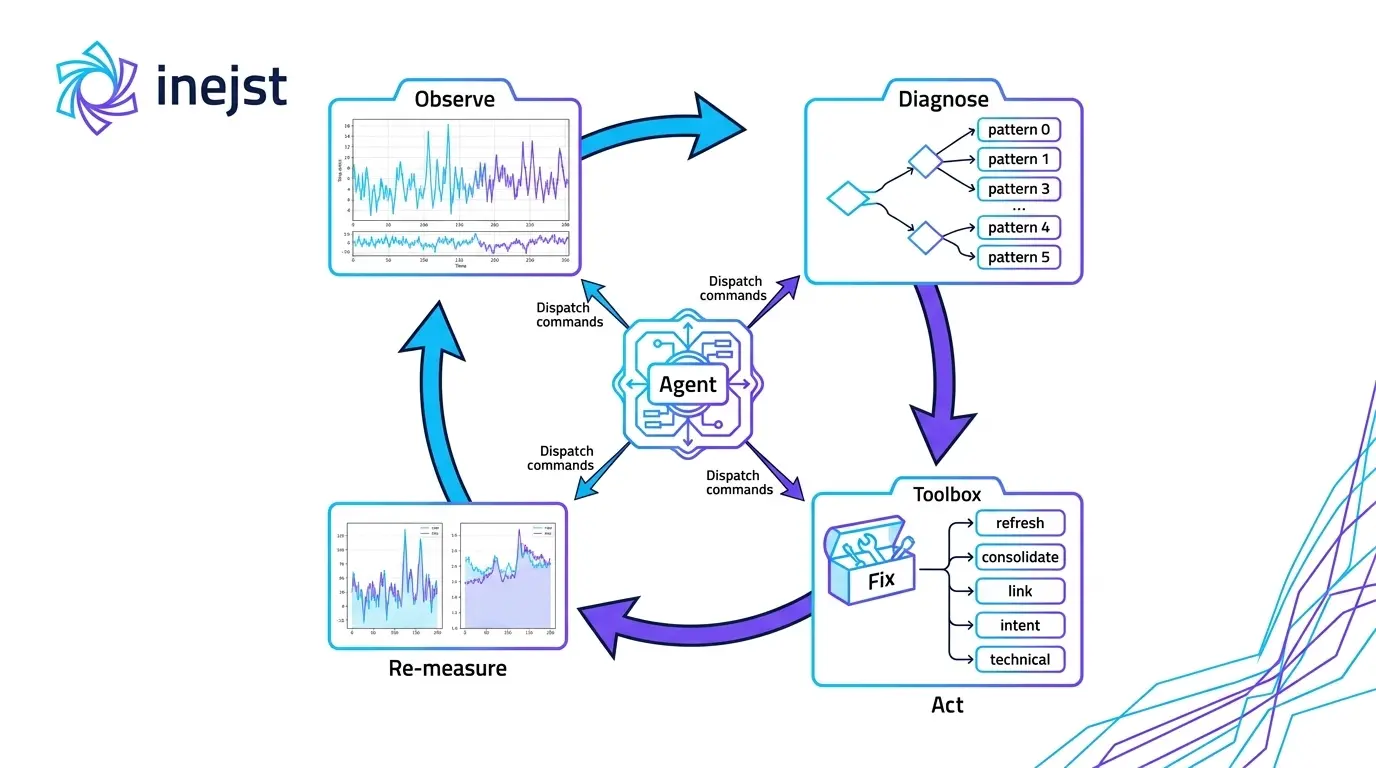
The loop that produces traffic has four steps and the tracker only covers the first. Track: record positions daily per keyword, location and device. Diagnose: classify what the movement means. Act: ship the one change the diagnosis calls for. Re-measure: wait for Google to recrawl and re-rank, then compare to the baseline.
Each step fails differently. Tracking fails when the keyword list is wrong; diagnosis when every drop gets the same explanation ("algorithm update"); action when the fix is a rewrite instead of the specific gap; re-measurement when you judge after four days.
Rank data shows five patterns, and each one means something different
Slow decay: a few positions lost over six to twelve weeks
The most expensive pattern because nobody notices it. A page that held position 3 drifts to 5, then 7, with no single bad day. The usual cause is freshness: competitors have updated pages that now answer the query more completely, and yours has not changed since launch.
Sudden drop: five or more positions in a day or two
Something discrete happened. On your side: a title or H1 change, a canonical pointing elsewhere, a noindex tag from a theme update, a redirect. On Google's side: a core update, or a SERP layout change that added an AI Overview or Shopping unit above you. On the competitor's side: a new page that outranks you. This pattern has the most possible causes, and it is where alerts on rank drops earn their place.
Volatility: bouncing between, say, 4 and 9 day to day
Google has not settled on which page answers the query, or the query has mixed intent (half the searchers want to buy, half want to compare). Volatility also appears when two of your own pages trade places for the same term, which overlaps with the fifth pattern.
Stuck at 11 to 20: page two for months
The page is relevant enough to rank but not strong enough for page one. This is usually a signals problem, not a content problem: too few internal links, no external links, or a title that under-promises compared to the top ten. These keywords are the highest-return work in SEO because the content exists and the gap is small.
Ranking with the wrong page
Your blog post ranks for a buying query while your category page sits at 30, or a product page outranks the collection it belongs to. Traffic lands on a page that cannot convert it. This is cannibalization, and it is invisible in Search Console's default view, which reports the query but not which of your URLs won.
One primary action per pattern
| Pattern | Primary action | What not to do |
|---|---|---|
| Slow decay | Refresh: update facts, add the questions competitors now answer, improve the title, re-publish with a new modified date | Rewrite from scratch; you lose the signals the page accumulated |
| Sudden drop | Technical check first (index status, canonical, title, noindex), then SERP check for new competitors or features | Change the content before you know what moved |
| Volatility | Intent fix: pick one intent for the page and make the title, intro and structure match it | Add more content for both intents on one page |
| Stuck at 11 to 20 | Internal links from your strongest pages with descriptive anchors; then a title rewrite that matches the top-ten pattern | Wait for it to "mature" |
| Wrong page ranking | Consolidate: canonicalize or redirect the weaker URL, or re-point its internal links and title to the intended page | Delete the ranking page |
Two rules sit on top of the table. Change one thing per page per cycle, or you will not know what worked. Prioritize by revenue impact of the landing page, not by size of the drop: a 3-position drop on a category page that drives 20 percent of orders beats a 15-position drop on a blog post.
A weekly rhythm a two-person team can hold
Monday, 60 minutes, together. Open the tracker filtered to money keywords. Classify every page that moved outside its normal range into one of the five patterns and write the pattern in a shared sheet. Pick at most three actions for the week, ranked by landing-page revenue, and assign each.
Tuesday to Thursday, async. Ship the three actions. A refresh takes two to three hours; an internal-link pass takes 30 minutes; a consolidation takes an hour including the redirect. Log the ship date; this is what makes re-measurement possible.
Friday, 15 minutes. Handle alert interrupts that need a technical fix before the weekend. Do not evaluate this week's changes yet.
Three weeks later, in the Monday slot. Compare each shipped page to its pre-change baseline. Improved: note what worked and find similar pages. No change: the diagnosis was wrong, so reclassify. Worse: revert if the change was structural.
The sheet is the asset: after a quarter you will know your site's response time to a refresh and which pattern is most common. To make the tracker's reports fill it for you, see automated rank tracker reporting features.
Where automation removes the human step
Every step in the loop except final approval can be automated in 2026. Diagnosis is worth automating first because it is where teams are slowest and least consistent.
Pattern detection. A tracker that classifies movement into the five patterns itself, using each keyword's own historical range rather than a fixed threshold, removes the Monday triage. Scalnex's keyword tracking does this: it watches the daily series and labels decay, sudden drops and volatility rather than only reporting the position.
Cannibalization detection. The wrong-page pattern needs a tool that records which of your URLs ranked each day. When the ranking URL changes, or two of your URLs appear for one query, that flag should never have to be found by hand.
Auto-refresh tasks. This is where agent platforms differ from trackers. On a slow-decay flag, Scalnex drafts the refresh against the current top-ranking pages, proposes internal links from your highest-traffic pages, and queues the result as a task; with the WordPress plugin connected, approval publishes it. The human step moves from "find, diagnose and write" to "read and approve": 30 minutes instead of three hours.
Trackers from Semrush, SE Ranking and AccuRanker report the movement well and will alert you; they do not take the next step. Whether that step is worth paying for depends on whether your team can ship three actions a week. Most cannot, which is why the sheet stops being filled by week six.
FAQ
How long after a change should I wait before judging ranks?
Three weeks for a content refresh or internal-link change; Google needs to recrawl, re-index and re-rank, and daily noise needs time to average out. Technical fixes such as a removed noindex can show in days. Judging after four or five days leads to reverting changes that were working.
How many keywords should I track?
Enough to cover every page that matters commercially, and no more than you can act on. For most D2C stores that is 50 to 300 keywords: two to five per money category, one to two per top product, plus the blog posts that feed those pages. Tracking 2,000 keywords you never triage produces a bigger report, not more traffic.
Should I track competitors?
Yes, two or three per keyword group, chosen from who ranks in the SERP rather than from your market map. Competitor positions turn an unexplained drop into an explained one: if they rose as you fell, open their page and see what they added. Without competitor data, every drop looks like an algorithm change.
What is a good position-change threshold for an alert?
Base it on each keyword's normal range rather than one number. A term that sits at 3 and never moves more than one position should alert on a two-position drop; a term that bounces between 8 and 14 should alert only on leaving that range. For money keywords, three positions is a common starting threshold.
If your tracker tells you what moved but your team still spends Monday working out why, book a Scalnex demo. Bring the keyword list you track today; we will show the five patterns in your own data, and what a refresh task looks like when the platform drafts, links and queues it before anyone opens a report.