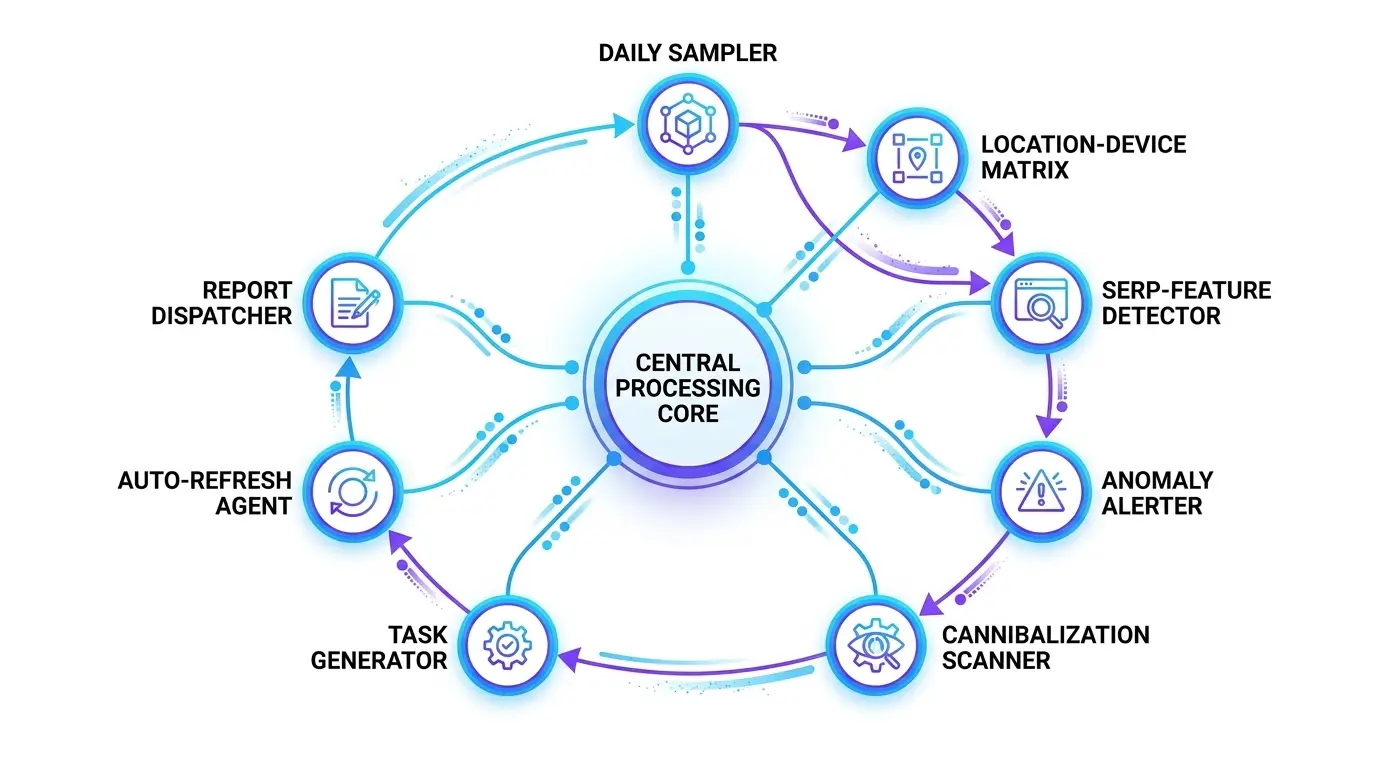
Automated rank tracking features that change what you do each week
Automated rank tracking features are the ones that remove a human step, not the ones that run a report on a timer. A scheduled PDF is still manual tracking if a person has to open it, spot the drop, decide what it means, and create the task. Below: the three points where manual checking breaks, the eight features that make tracking genuinely automated, and what the benefits look like in hours and decisions rather than invented percentages.
TL;DR
- Manual rank checks fail on sampling bias, missing history, and the absence of a trigger that starts work.
- "Scheduled" means the data arrives on time. "Automated" means the next action is created without you.
- The eight features to require: daily sampling, location/device matrices, SERP-feature detection, anomaly alerts, cannibalization detection, task creation on drops, auto-refresh of decaying content, and reporting delivery.
- The benefit is a shorter loop from drop to fix, which is measured in days recovered, not dashboards built.
Want this running on your own keywords? Scalnex tracks rankings daily, alerts you when a page drops and opens the fix as a task. Book a 30-minute demo →
Manual rank checking fails at three predictable points
Sampling bias: you check when you remember, from where you sit
Searching your own keyword in an incognito window gives one result from one location, one device, one moment, shaped by your IP and whatever Google is testing that hour. Checking only on Mondays, or only when a sale is on, builds a picture that reflects your habits rather than your visibility. Search Console helps, but its position is an average across all impressions, which hides a mobile collapse behind a desktop gain.
No history: you cannot see a slow decay
A page that slides from 4 to 7 over eight weeks loses most of its clicks and never triggers alarm, because each individual check looks fine. Without a daily time series you only notice when it leaves page one, by which point the recovery takes longer than the decline did.
No trigger: data without a next step
Even a good manual check ends with a number in a spreadsheet. Nothing happens until someone interprets it, decides on a fix, and assigns it. In a two-person D2C team that step waits for the weekly meeting, and the weekly meeting is usually about ads.
Eight features that make tracking automated rather than scheduled
1. Daily sampling on a fixed schedule
Daily data makes the difference between "we dropped" and "we dropped on the 14th, two days after the template change." Weekly data cannot localize cause. If your tracker updates weekly, you are debugging with a seven-day blur.
2. Location and device matrices
Positions differ by city and device, and for an Indian D2C brand the gap between Mumbai mobile and Bengaluru desktop can be several positions. A tracker should let you define a matrix (keywords × locations × devices) and report at each cell, with roll-ups by tag.
3. SERP-feature detection
Record which features appeared (Shopping, image pack, People Also Ask, AI Overview, video) and whether you were in them. Position 2 under an AI Overview and a Shopping unit is a different click outcome from position 2 at the top of the page. A tracker that logs only the blue-link position is measuring a SERP that no longer exists.
4. Anomaly alerts, not threshold spam
A fixed threshold ("alert me on any 3-position drop") fires constantly on volatile long-tail terms and misses the slow decay on head terms. Better: alerts based on deviation from a keyword's own recent range, grouped by page or cluster, so one email says "men's footwear category pages down across 12 keywords" instead of twelve emails.
5. Cannibalization detection
When the ranking URL for a keyword flips between two of your pages, or two of your pages hold positions for the same query, the tracker should flag it. This is the most common fixable cause of unstable rankings on e-commerce sites and it is invisible in a keyword-only view.
6. Task creation on drops
This is the line between scheduled and automated. When a revenue page drops past its threshold, the platform should diagnose likely causes (title change, indexing issue, competitor's new page, lost internal links) and create the task: refresh, re-link, or check indexing. Scalnex does this as part of its keyword tracking: the drop becomes a task with a diagnosis attached, and the task is assigned to an agent or a person, not left as a red cell in a report.
7. Auto-refresh of decaying content
Content loses rankings as it ages and competitors publish. A tracker that detects a sustained slide on a page that previously ranked well should queue it for a refresh, pull the current top-ranking pages for comparison, and either draft the update or hand the brief to a writer. Calendar-based refreshes ("every page every six months") waste effort on pages that are fine and miss the ones that are not.
8. Reporting delivery with the work included
A weekly report should arrive unrequested and include what was done about last week's movements, not only the movements. "Fell 5 on Tuesday; refresh published Thursday; back to 4 by Sunday" is a report someone will read. Our piece on turning rank tracking data into organic growth covers the weekly rhythm that fits around this kind of reporting.
The benefits, counted in hours and decisions rather than percentages
Time you stop spending
Checking 100 keywords by hand in Search Console and incognito searches takes roughly an hour a week and produces a view that is already stale. Turning the spreadsheet into a shareable report takes another. Automated tracking with delivered reporting removes both, and the location matrix and SERP-feature data it produces was never achievable by hand at any time cost.
Decisions you make sooner
The loop from drop to fix has four stages: notice, diagnose, decide, do. Manual tracking makes "notice" wait for the next check and "decide" wait for the next meeting, so a Tuesday drop is acted on the following Monday at best. Anomaly alerts collapse "notice" to the same day, an attached diagnosis collapses "diagnose," and task creation collapses "decide." Fixes then land while the page still has momentum: recovering from position 7 is faster than from position 15, and the gap between those starting points is usually how long the drop went unnoticed.
Fewer wrong fixes
Manual checking invites over-reaction to noise: a keyword jumps from 6 to 9 for a day and someone rewrites the title. Daily history and deviation-based alerts show the move is inside the keyword's normal range, and the title stays.
Rank the features by human steps removed, then shop
For most D2C brands the order is: task creation on drops, cannibalization detection, anomaly alerts, daily sampling, then the rest. A tool that does the first three poorly will not be rescued by excellent SERP-feature charts. Our rank tracker software comparison scores the main tools on these criteria, including which ones only report and which ones act.
FAQ
What are the benefits of using automated rank tracking solutions?
Consistent daily data from fixed locations and devices instead of ad-hoc checks, a history that reveals slow decay, alerts that catch drops the day they happen, and in the better tools a task created automatically so the fix starts without a meeting. The net effect is a shorter gap between a drop and its recovery.
What are the advantages of automated rank tracking software over manual?
Manual checking is biased by when and where you search, has no time series, and ends with a number rather than an action. Automated software samples the same way every day, keeps history, detects SERP features and cannibalization, and can hand the drop to someone or something that fixes it.
How often should automated rank tracking update?
Daily for revenue-critical keywords and any page you have recently changed. Weekly is acceptable for a long tail you are not actively working on. Less than weekly makes it impossible to connect a ranking change to the site change that caused it.
Does automated rank tracking replace Google Search Console?
No. Search Console provides first-party clicks and impressions and should stay in your stack. Its position is an average across all impressions, so it cannot show daily movement at a given location or device. A tracker adds the time series, the matrix and the trigger; Search Console supplies the click reality check.
If drops on your money pages are still being found in a Monday meeting and fixed the following quarter, see what it looks like when the tracker creates the task the same day. Book a Scalnex demo and we will load your core keywords, show the alert and diagnosis on a recent drop, and walk through the refresh the platform would have queued.